Benchmarks
Hello-world throughput of tako's two serving models against Axum, Actix Web, and ntex under loopback, server-bound, and pipelined load.
Hello-world throughput is not the whole story, but it shows whether the request hot path leaves performance on the table. This page compares tako's two serving models with Axum, Actix Web, and ntex under three loads in the same Linux container.
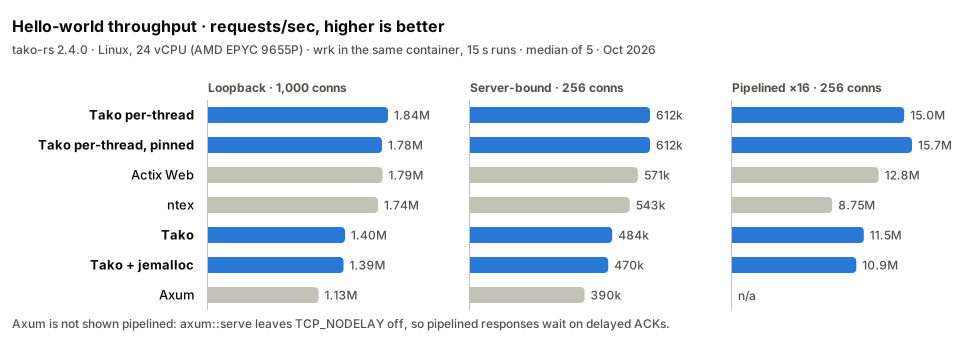
Measured on 2026-10-01 with tako-rs 2.4.0 in a Railway container: a 24 vCPU
quota on an AMD EPYC 9655P host, Linux 6.18, Rust 1.98.1, and wrk 4.1.0.
Three loads
- Loopback. 12 server workers and 12
wrkthreads share the CPU quota, and each connection sends one request at a time. Kernel time for the loopback TCP traffic takes about 5 µs of the roughly 6 µs of server CPU per request, so the thread-per-core servers land close together. - Server-bound. 4 server workers face 16
wrkthreads. The server runs out of CPU first, so its cost per request decides the result. - Pipelined.
wrkwrites 16 requests at a time on each connection, as in the TechEmpower plaintext test. Each syscall serves up to 16 requests, so the framework's own work dominates.
Results
Requests per second are the median of five 15-second runs. CPU per request is the server's user plus system time divided by the requests it served. Spread is half the range of the five runs, relative to the median. No run recorded a socket error or a non-2xx response.
Against tako-rs 2.3.0 in the same run, each with its default settings, the default server serves 20% more requests at 1,000 connections, 21% more server-bound, and 53% more pipelined; the per-thread server serves 9% more server-bound and 30% more pipelined.
Loopback, 100 connections
| Framework | Requests/sec | p50 | p99 | CPU per request | Spread |
|---|---|---|---|---|---|
| Tako per-thread | 1,791,799 | 0.04 ms | 0.80 ms | 6.09 µs | ±1.7% |
| Actix Web | 1,730,462 | 0.04 ms | 2.78 ms | 6.42 µs | ±3.2% |
| Tako per-thread, pinned | 1,729,861 | 0.04 ms | 2.15 ms | 6.13 µs | ±8.0% |
| ntex | 1,668,935 | 0.05 ms | 1.08 ms | 6.97 µs | ±4.8% |
| Tako + jemalloc | 567,643 | 0.14 ms | 0.94 ms | 9.23 µs | ±8.3% |
| Tako | 553,666 | 0.15 ms | 0.90 ms | 9.08 µs | ±11.7% |
| Axum | 528,781 | 0.16 ms | 1.03 ms | 11.28 µs | ±6.4% |
Loopback, 1,000 connections
| Framework | Requests/sec | p50 | p99 | CPU per request | Spread |
|---|---|---|---|---|---|
| Tako per-thread | 1,842,063 | 0.26 ms | 1.24 ms | 5.93 µs | ±4.6% |
| Actix Web | 1,786,640 | 0.43 ms | 3.02 ms | 6.32 µs | ±2.7% |
| Tako per-thread, pinned | 1,780,810 | 0.27 ms | 3.38 ms | 6.06 µs | ±4.9% |
| ntex | 1,740,750 | 0.52 ms | 1.96 ms | 6.67 µs | ±2.6% |
| Tako | 1,401,625 | 0.61 ms | 1.96 ms | 7.58 µs | ±4.6% |
| Tako + jemalloc | 1,386,954 | 0.62 ms | 2.16 ms | 7.79 µs | ±3.7% |
| Axum | 1,132,259 | 0.76 ms | 2.57 ms | 10.10 µs | ±6.1% |
Server-bound, 256 connections
| Framework | Requests/sec | p50 | p99 | CPU per request | Spread |
|---|---|---|---|---|---|
| Tako per-thread | 612,091 | 0.40 ms | 1.47 ms | 6.42 µs | ±1.1% |
| Tako per-thread, pinned | 611,956 | 0.40 ms | 1.53 ms | 6.44 µs | ±1.9% |
| Actix Web | 570,865 | 0.42 ms | 1.66 ms | 6.84 µs | ±1.9% |
| ntex | 543,076 | 0.45 ms | 1.53 ms | 7.20 µs | ±2.9% |
| Tako | 483,526 | 0.50 ms | 1.40 ms | 7.90 µs | ±2.8% |
| Tako + jemalloc | 469,807 | 0.52 ms | 2.21 ms | 8.13 µs | ±3.6% |
| Axum | 389,844 | 0.64 ms | 1.50 ms | 9.95 µs | ±1.8% |
Pipelined, 256 connections
| Framework | Requests/sec | CPU per request | Spread |
|---|---|---|---|
| Tako per-thread, pinned | 15,716,822 | 0.75 µs | ±5.9% |
| Tako per-thread | 15,033,668 | 0.77 µs | ±3.8% |
| Actix Web | 12,806,477 | 0.90 µs | ±3.4% |
| Tako | 11,512,467 | 0.91 µs | ±8.5% |
| Tako + jemalloc | 10,853,271 | 0.97 µs | ±8.0% |
| ntex | 8,749,294 | 1.31 µs | ±3.9% |
With 16 requests per write, wrk records one latency per batch, so this table
leaves latency out. Axum is left out too: axum::serve leaves TCP_NODELAY
off, so pipelined responses wait on delayed ACKs, and it served 88,398 requests
per second. Turning nodelay on through axum's ListenerExt::tap_io avoids that.
Two serving models
The default server, Server::builder(), runs on Tokio's multi-threaded,
work-stealing runtime, the same model as Axum. It serves about 24% more
requests than Axum at 1,000 connections and when the server is the bottleneck,
because it spends less CPU on each request: 7.6 µs against 10.1 µs at 1,000
connections. At 100 connections the two land within 5% of each other.
Since 2.4 a hello-world request does not allocate, so jemalloc no longer pulls ahead: Tako + jemalloc lands between 3% above and 6% below Tako. It can still pay off for handlers that allocate; see Deployment.
The per-thread feature runs one current-thread Tokio runtime per worker, each
with its own SO_REUSEPORT listener. It hands each new connection to the
worker with the fewest live connections, and the connection then stays on that
worker, so requests never cross threads. Actix Web and ntex use the same shape.
Tako per-thread serves about 3% more requests than Actix Web on loopback, 7%
more when the server is the bottleneck, and 17% more pipelined.
The Tako per-thread, pinned rows turn on pin_to_core, which pins each
worker to a CPU core and is off by default. Pinning gained about 5% pipelined,
made no difference server-bound, and cost about 3% on loopback with a longer
latency tail, because pinned workers compete with the co-located wrk threads
for their cores. Every process pins from core 0, so turn it on only when the
server has the machine to itself.
Per-thread workers serve HTTP/1.1; TLS, h2c, and PROXY listeners use the
regular server builder. The kernel balances connections across SO_REUSEPORT
listeners only on Linux, so measure per-thread throughput there. See
Thread-per-core for the entry points.
The Compio flavour (per-thread-compio) is not in the tables: the container
blocks io_uring, so its runtime cannot start there.
Methodology
-
Servers. Each framework serves
GET /→Hello, World!from a minimal release binary (lto = "fat",codegen-units = 1) with its default settings; every response is the same 130 bytes. Versions: tako-rs 2.4.0, axum 0.8.9, actix-web 4.15.0, ntex 3.12.3, tokio 1.53.1. -
Load.
wrkruns in the same container and connects over loopback. The loopback and pipelined loads split the 24 vCPU quota into 12 server workers and 12wrkthreads; the server-bound load gives the server 4 workers andwrk16 threads. For the pipelined load, a Lua script makeswrkwrite 16 requests at a time:init = function(args) local batch = {} for i = 1, 16 do batch[i] = wrk.format(nil, "/") end req = table.concat(batch) end request = function() return req end -
Runs. Each measurement is a 3-second warm-up followed by a 15-second
wrk --latencyrun. Five rounds rotate the server order, and the tables report medians. -
CPU. The server's user and system time come from
/proc/<pid>/stat, read before and after each run. -
jemalloc. The
jemallocfeature only re-exports the allocator; the benchmark binary installs it:#[global_allocator] static GLOBAL: tako::Jemalloc = tako::Jemalloc;
Caveats
These are baselines, not universal claims. The container shares its host with other tenants, the load generator shares the CPU quota with the server, and loopback removes the real network. A hello-world route isolates the request hot path; application logic, TLS, and payload size change the picture. Reproduce on your own hardware before drawing conclusions.
Reproducing locally
The default server is
examples/hello-world:
cargo run --release --manifest-path examples/hello-world/Cargo.toml
# in another terminal:
wrk -t4 -c100 -d15s --latency http://127.0.0.1:8080/
Save the Lua script above as pipeline.lua to repeat the pipelined load:
wrk -t4 -c256 -d15s -s pipeline.lua http://127.0.0.1:8080/For the per-thread server, use
examples/bench-pt
on Linux. It takes the mode, the address, and the worker count:
cargo run --release --manifest-path examples/bench-pt/Cargo.toml -- pt-tokio 127.0.0.1:8080 4bench-pt counts requests for its load-distribution report, so expect it to
land somewhat below the numbers above.
Last updated on
Deployment
The three tako deployment shapes — single binary, thread-per-core, and behind a load balancer — plus socket activation and graceful shutdown.
Migrating to 2.5
Tako 2.5 replaces tokio-tungstenite with its own WebSocket engine; move handlers from TakoWs to WebSocketUpgrade and compio-ws to compio plus ws.